



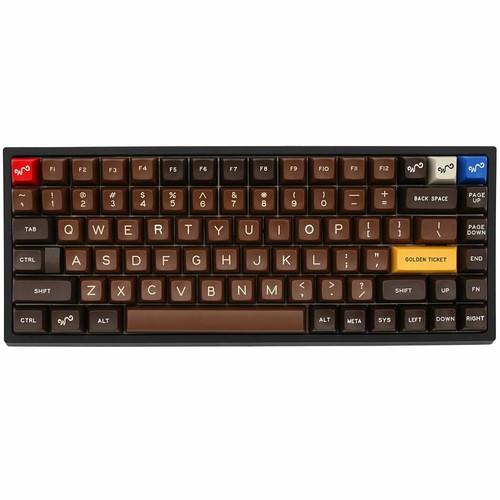
When it comes to mechanical keyboards, layout choice can significantly impact your typing experience and desk setup. Two popular compact layouts are the 75 keyboard and the 65 keyboard. Both offer a balance between functionality and space-saving design, but which one is right for you? Let’s dive into the details.
Understanding the 75 Keyboard Layout
The 75 keyboard is a compact keyboard that retains all essential keys, including the function row, arrow keys, and a few navigation keys, arranged in a tighter format. It’s essentially a full-size keyboard condensed into a smaller footprint, making it ideal for users who want a complete typing experience without the bulk.
Pros of a 75 Keyboard:
- Full function row and dedicated arrow keys
- Compact design saves desk space
- Easier transition from a standard keyboard
Cons of a 75 Keyboard:
- Slightly wider than other compact layouts
- May take time to get used to tighter key spacing
Exploring the 65 Keyboard Layout
The 65 keyboard is even more compact than the 75 layout, focusing on saving desk space while maintaining essential functionality. This layout typically omits the function row but keeps arrow keys and some navigation keys, making it a favorite among minimalist setups and gamers.
Pros of a 65 Keyboard:
- Highly compact and portable
- Retains arrow keys for efficient navigation
- Sleek and modern design
Cons of a 65 Keyboard:
- No dedicated function row
- Learning curve for users accustomed to full-size keyboards
Key Differences Between 75 Keyboard vs 65 Keyboard
When comparing 75 keyboard vs 65 keyboard, the main differences lie in key availability and layout compactness:
| Feature | 75 Keyboard | 65 Keyboard |
| Function Row | Yes | No |
| Arrow Keys | Yes | Yes |
| Navigation Keys | Limited | Limited |
| Desk Space Usage | Moderate | Minimal |
| Ideal Users | Typists, office users | Gamers, minimalists |
Which Layout Should You Choose?
Choosing between a 75 keyboard vs 65 keyboard depends on your needs:
- Choose a 75 Keyboard if you want a near-full typing experience with function keys and minimal compromise. It’s great for productivity tasks and general typing.
- Choose a 65 Keyboard if your priority is desk space and portability. It’s perfect for gamers or users who prefer a minimalist aesthetic and don’t frequently use the function row.
Conclusion
Both 75 and 65 keyboards have their unique advantages. Understanding your typing habits, workspace requirements, and functionality needs will help you make the right choice. Whether you prioritize a more complete layout or ultimate compactness, there’s a perfect keyboard layout waiting for you.
